Sunday, August 30, 2009

Old Games on New Operating Systems - TIE Fighter

This post is a departure from my normal beer reviews and exercise analysis. I'm going to start using this blog to post a wider variety of information, and this post has everything to do with technology and video games. Specifically, how to get some older games to work on newer operating systems.


TIE Fighter
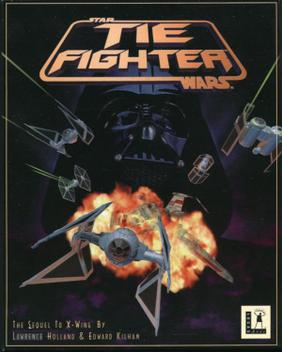

This is widely considered one of the top ten best PC games of all time, and since the advent of the XP/OS X era nary has then been a machine that can run the game. A travesty to be sure.


So here's how to get the game to run on Mac OS X (Leopard). As soon as I upgrade to Snow Leopard, I will update this post. Here it goes:


  1. You will need to emulate the old operating system, MS-DOS. This can be done thanks to the diligent work by the people at the DOSBox project. Download the program for your current OS here. The current version for OS X is DOSBox 0.73. The dmg file should automatically mount to your desktop. Go ahead and open the little white disk icon, and drag the DOSBox icon to your applications folder.


  2. You will need a copy of the TIE Figher CD-ROM. I'll assume that if you're reading this, you already have the CD taunting you from your software library. Go ahead and load the CD into your optical drive.


  3. Now plug in your USB joystick. If you have the old RS-232 pin style joystick it won't work, mostly because modern computers don't have this connectivity anymore. PLUG IN YOUR JOYSTICK BEFORE STARTING DOSBOX


  4. Ok, now go ahead and start up DOSBox from your applications folder. You should see a small window that looks like this:


  5. If you know anything about DOS you'll probably start typing in all of your old favorite commands, only to get a cryptic error message asking you to mount C. While this might seem vulgar, what DOSBox is asking you to do is to identify the location on your computer that you'd it to think of as home (C:) Type:

    Z:\>mount c /users
    Note: This sets your Users folder as the C: directory as far as DOS is concerned. You may set the C: to any directory on your machine. I set it to Users simply because it's a low level directory.


  6. You need to make sure that DOSBox has permission to read, write, and execute files inside your Users folder (or whatever folder you set as C:). Find the folder using the Finder, and right click on it. A contextual menu should appear; choose "Get Info." Scroll to the bottom of the window that appears and set everyone and admin to "Read & Write." If this makes you a little uncomfortable, just be sure to change these setting back to the defaults when you are on any foreign networks.


  7. Back to the DOSBox window. We need to let DOSBox know where your CD-ROM drive is. Most DOS games, including TIE Fighter, need to grab files from the CD-ROM during game play. Type:
    Z:/>mount d /volumes/tiecd -t cdrom
    All drives on OS X are located in this "volumes" folder, and the name of your CD is "tiecd" the "-t and cdrom" commands let DOSBox know how it should access the CD-ROM drive during gameplay.


  8. We can now leave the Z drive behind (which doesn't really exist), and begin to install TIE Fighter. Type:
    Z:/>d:


  9. Type: D:\>tie.exe The installer graphic should show up in the DOSBox window.

    Choose "Maximum Install," and follow the directions it gives you. The only choice that won't be obvious will be between express and custom install of your soundcard, choose express. If the installer won't let you pick any of the install options, it means you are not operating from the CD-ROM. Go back to the previous step.


  10. After the installer finishes, click exit. The installer will give you the option to the play the game, go ahead, if you'd like. I'll continue to explain.


  11. You will still need the CD-ROM in your drive to play, but now you'll play from the C: drive. Type: D:/>c:


  12. Type: C:\>cd tiecd This moves into the folder "tiecd" that was created in your "Users" folder


  13. Type: C:\TIECD>tie This starts the game. Enjoy!


  14. Now that you have it set up, you'll need to do only a few of the above to get TIE Fighter running. Everytime you start DOSBox, do the following:
    • Z:\>mount d /volumes/tiecd -t cdrom

    • Z:\>mount c /users

    • Z:\>c:

    • C:\>cd tiecd

    • C:\TIECD>tie


One last thing. Depending on your joystick model, you may experience very frustrating joystick behavior. Often the calibration doesn't work, or the joystick will seem to send random jerks that you didn't input. You may need to go into the DOSBox configuration file. Open the Finder and click on "Macintosh HD." Enter the "Library" folder, and find the "Preferences" folder. Inside that there will be the "DOSBox 0.73 Preferences" file. Open it. Find the [Joystick] section near the bottom. Set: joystick=2axis, timed=false, autofire: true, swap34=false, buttonwarp=false. You may need to set "joystick" equal to one of the other settings mentioned in the comments directly below the [joystick] heading.

Sunday, June 28, 2009

Polk City Nano-brew No. 2

This evening I was greeted by an amber-red stein of hoppy goodness. From the crack of the cap to the last pour, this beer flavored the very air with floral notes much like the scene in Pixar's Ratatouille where Remy eats some Camanbere and hears dancing pixie jazz music.

I drank this second offering from Polk City's newest brewer out of a straight-sided glass stein. The material isn't particularly fond of developing lace, but nevertheless this beer had its way with my glass. A quick swirl left a perfectly even layer of foam around the entire circumference of the vessel. This shows signs of excellence during the brewing process.

At first taste, this beer reminds me of the new style that is the American Hop-Laden Ale. Born from the IPA, this beer is an attempt to pay tribute the famous "Two Hearted Ale" brewed by Bell's in Michigan. I'm actually enjoying the Polk City version a tad bit more. The hops aren't quite as exaggerated, leaving me with a more even entrance-to-bouquet ratio.

Speaking of, let's talk bouquet. If you have ever thought that downing a swig of malted prairie meadow sounded great, then this beer is for you. If you haven't, you're wrong, and this beer is still for you.

As my stein empties, and the beer warms ever so slightly, the tender care put into the hopping stages has become very apparent. Hints of lavender, heather, and cascade hops are doing a dance all up in my sinuses. Also, nearing the end of my experience, the alcohol content has become quite apparent, and is not low.

All in all: 9/10

Monday, April 20, 2009

D2D - Update

So, we're barely a month out from the race, and I need to step it up.

I went our for six miles on Sunday. It wasn't as hard as I thought it was going to be, but it definitely wasn't easy. I walked several times, and would probably guess that I averaged 9:30 miles. I didn't keep exact track of time, so I'm not going to post a graph.

I'll do six again tomorrow, weather permitting. You better believe I'll use the stopwatch!

Sunday, April 12, 2009

D2D - Update


Easter! Thought I was going to puke ham, but I made it. Ran a 5k, which is around 3 miles.

Single-Mile Runs = Blue
Double-Mile Runs = Red
Triple-Mile Runs = Yellow


Saturday, April 4, 2009

D2D - Update


So we're into April, and the race is now officially looming. I ran another two miles this morning after helping Lianna clean/watching Jacques Pepin cook on TV.

Not much else is really new. We're going to the Motley Cow this evening, which is one of the top three restaurants in the area. Now that spring is here I'm getting the itch to start cooking some more... Expect pictures of creations soon. I think I'm going to make grilled jerk shrimp today for lunch!

Oh! I almost forgot. I'm teaching a computer programming course this semester, and we're currently experimenting with server-generated emails. I wrote a program that can send text messages from the Internet, for free! Check it out.

D2D Data:

Blue = Single Miles
Red = Average Mile Times for 2-mile runs


Monday, March 30, 2009

D2D - Update


2-mile run today!

Blue Dots = Single Mile Runs

Red Dots = Double Mile Runs

Saturday, March 21, 2009

D2D - Update


The weather has been uncooperative at best, and the nicest day this week was St. Patrick's day, which means beer not running. So, I went today, and here's my latest graph. I cut two minutes off my time! I think it had more to do with the temperature increase (and therefore, comfort increase) than me training... 

Monday, March 16, 2009

Polk City Pale Ale: A Tasting

An offering from central Iowa, Polk City Pale Ale's caramel color and distinct floral qualities pleased the palatte on this fine Spring day.

The first pour gave only hints to this slightly high-gravity ale's true nature. Due to insider information, I can tell you that the brewer intended this to be an IPA, but, through the magic of the brewing process, the hoppiness was reduced in favor of a much more taciturn bouquet. 

I poured the ale into a large glass stein. Very little head developed due to the large surface area of the vessel, and for a moment I feared that I had ruined the carbonation during transport. A quick swirl of the glass revealed a modest lace that hangs to the side of the glass no longer than any good ale should.

The first taste brought memories of sierra nevada, samuel adams' various ales, all riding atop a gutsier concentration of hop oils than seen in most traditional macro brew offerings. The flavor deveops in three distinct stages:

1. First you are hit with the smell and flavor of cascade hops that bites the tip of your tongue. 

2. As the ale moves across your palatte it develops a round but not too malty body.

3. After the swallow, you are treated to a lingering hoppy bite that makes you check your stein for pieces of hops often left in unfiltered brews. However, Polk City Pale Ale is as clean as they come, transluscent but not transparent, and with no cloudiness. 

An excellent beer. As I finish my first 12 oz., my only reprieve from sadness is knowing that I have at least two more bottles in the refridgerator!

Wednesday, February 18, 2009

D2D - Update

So I've been sick. I shouldn't have run on the 15th, it definitely exacerbated some respiratory thing that I had been developing. However, now I think I'm back to full speed, and will go for a run tomorrow after school. Results to be posted...

Ruby is getting spayed tomorrow. Lianna insists that I'm worried about it, mostly because I am. Medical things creep me out. Just in case you haven't turned your heart into popcorn butter lately:


Ok, I'll post my new graph tomorrow. Have fun. Don't punch any kids (that's my motto at school).

Sunday, February 15, 2009

D2D - Update


Not the best run. Turns out, on your first day back from sloth and lethargy, you move quite like a lethargic sloth.


Faster and Faster and Faster, though.

Dam to Dam

Earlier this week my sister-in-law Amy asked me if i'd like to run the Des Moines area Dam to Dam half marathon. I wasn't so sure when she asked. Training for something that large seems a little daunting. However, yesterday I was trying on clothes at Old Navy and I couldn't help but think things like, "bowl full of jelly," and "Buffalo Wild Wings." So my resounding answer is, "Dam to Dam!"


I'm going to post graphs of my progress, most likely in the form of mile times. My goal is to run 9-minute miles during the race, which puts my total half-marathon time at 1:48:00. My goal for my single mile is to break under 6 minutes. We'll see!


I ostensibly trained for a triathlon last year, but that never happened, so I'm a little worried about my commitment. Hopefully, having publicly declared my intention to crush this race will motivate me by fear of embarrassment and loss of credibility. I'm hoping it'll look something like this:


See you all later today with some charts and graphs (Ross Perot style).